Getting Started
Psychometric profiling API key — Portrait Docs
With the Portrait platform you can create a psychometric profiling API key to make it easier to integrate the technology with other systems.
NB: API tokens allow third-party services to authenticate with our application on your behalf.
To start creating the psychometric profiling API key, follow the procedure described in the series of images below.
First, click on the API menu item as shown in the figure below:
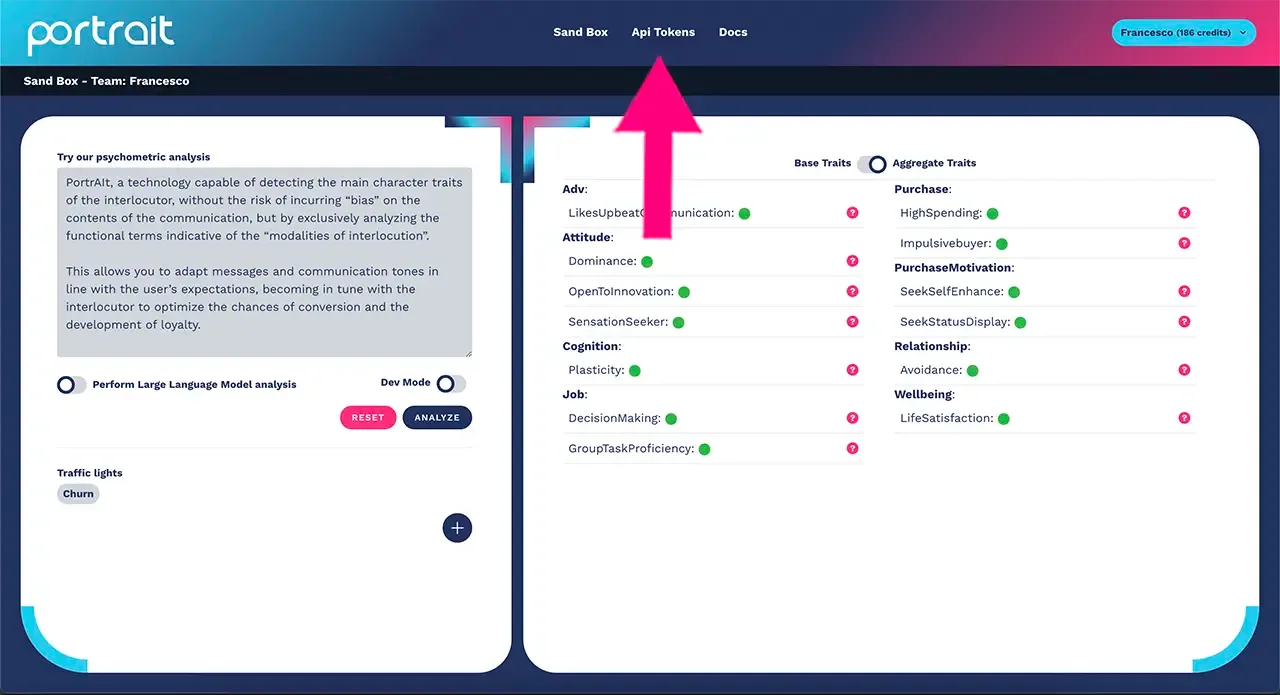
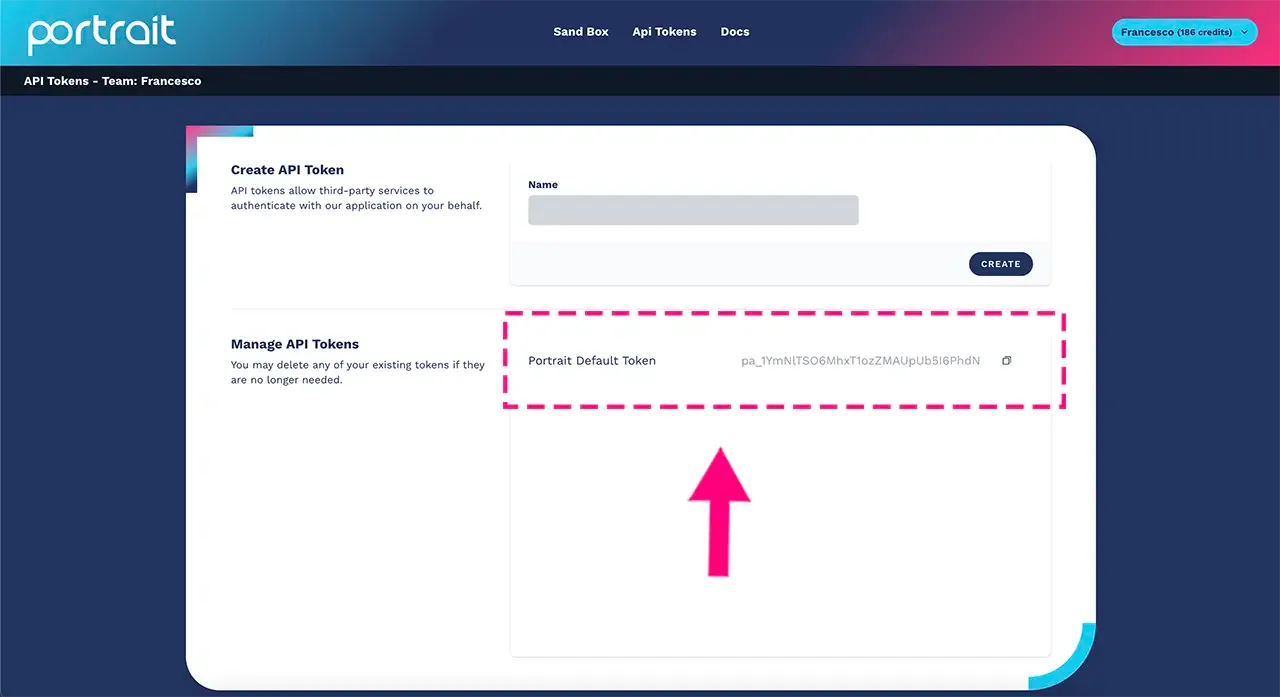
In the window that opens you will be able to create your API integration key with Portrait technology.
NB: a default token is automatically created by the platform, as shown in the figure:
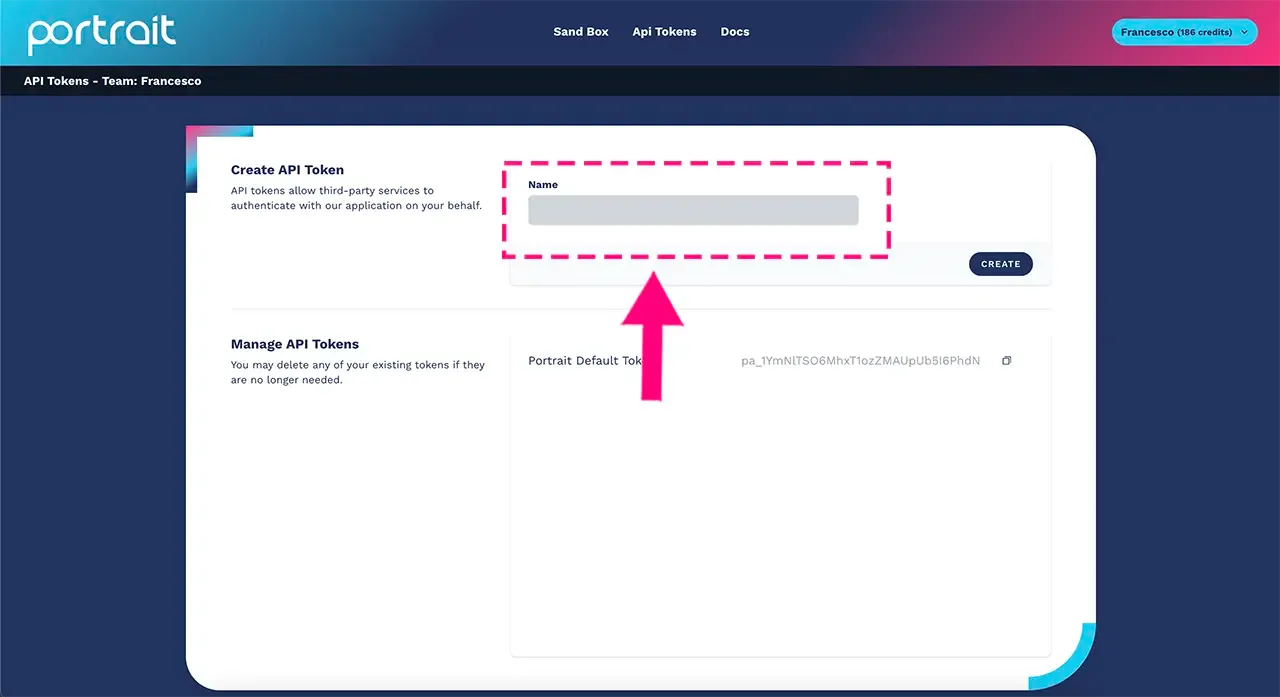
Start by writing a meaningful name for the API token, one that will remind you which system you are integrating psychometric profiling into:
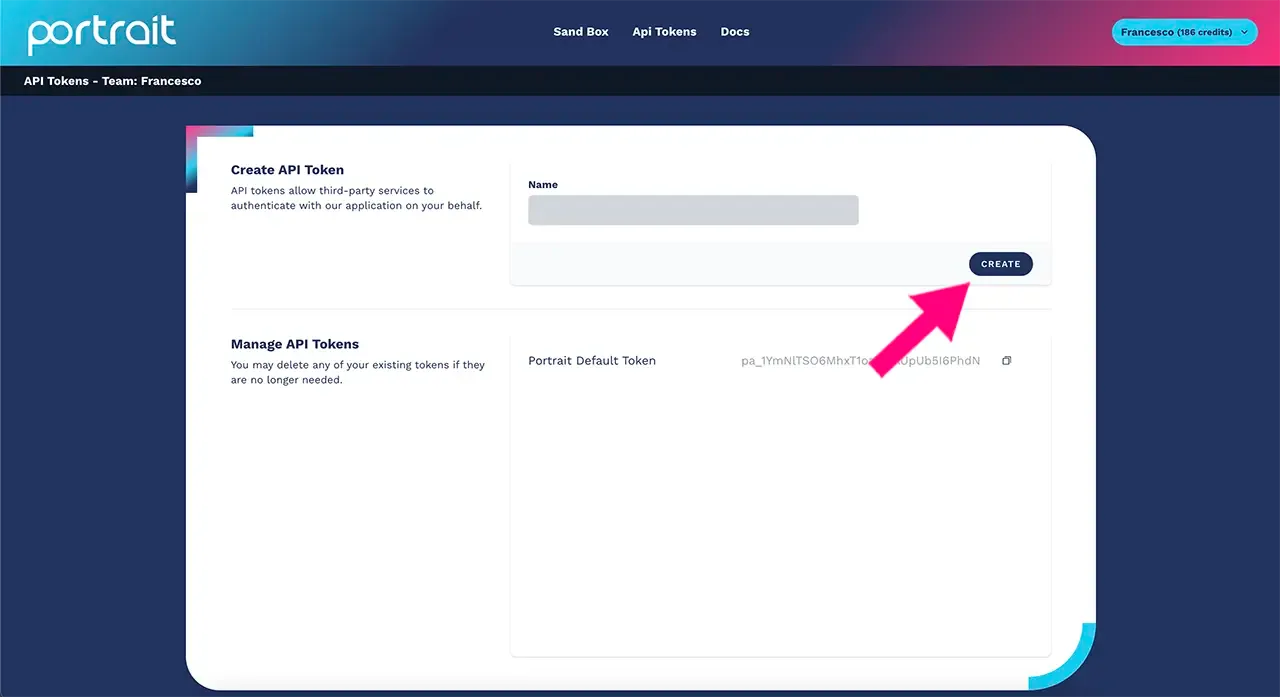
Click on the "create" button as shown in the figure to start configuring the API key:
At this point, your key will be added at the bottom with the name you chose, as shown in the figure below:
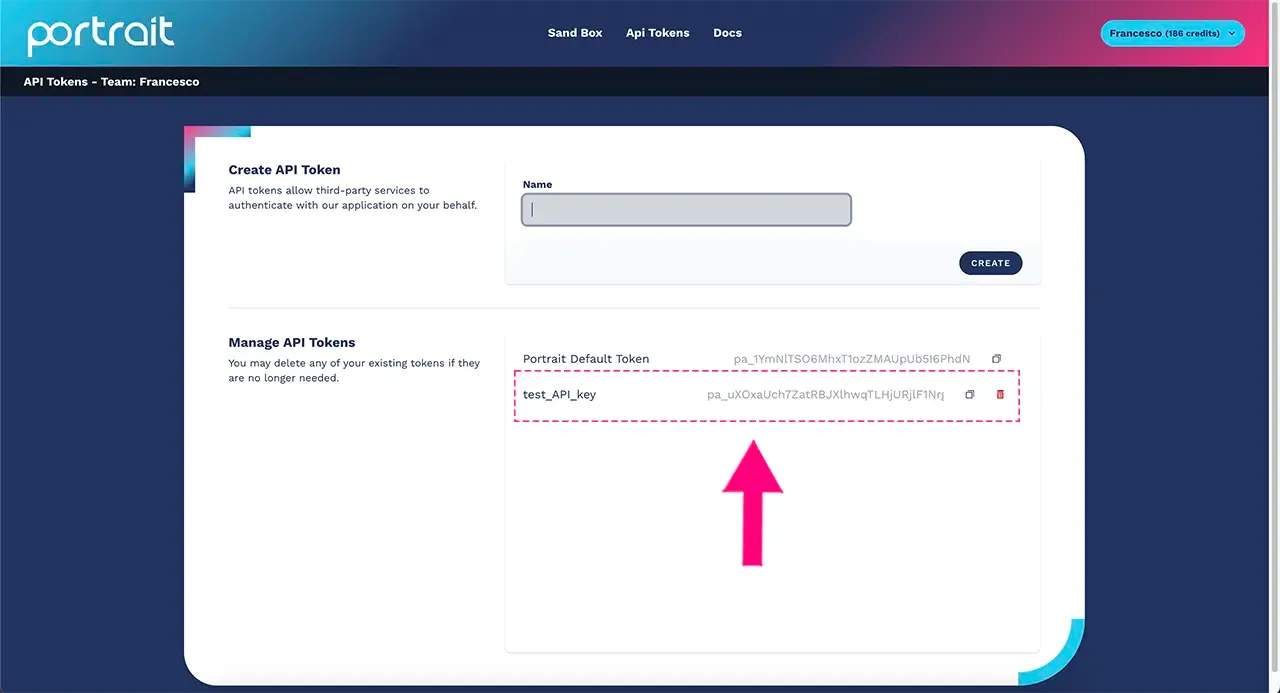
Use the "copy" button to copy your token number and integrate it into your preferred system. Use the trash icon to permanently remove the key.
NB: delete all your existing API tokens if they are no longer needed.
How to make an API request
curl --location 'https://app.portrait-profiling.ai/api/profile' \
--header 'Content-Type: application/json' \
--header 'X-API-Key: pa_*******' \
--data '{
  "text": "I am a very good person",
  "llm_goal": "I would like to know if the user is prone to make online purchases",
  "llm_language": "en",
  "correlations_matrix_all": false,
  "correlations_matrix": []
}'
Authentication
To authenticate, you need to pass the X-API-Key header with the value of one of the generated tokens. For more information on how to generate a token, go to the top of this page.
Parameters
text(string, required) – text to analyze.correlations_matrix_all(boolean, optional) – if true, all created correlation matrices are calculated. Default: false.correlations_matrix(array, optional) – array containing the ids of the correlation matrices that must be calculated. Ifcorrelations_matrix_allis true, this parameter is ignored.llm_goal(string, optional) – text representing the profiling goal to pass to the LLM.llm_language(string, optional) – language of the text passed to the LLM for evaluating the goal. Default: "en", accepted: it, en, fr, de, es.
Response
{
  "profile": {
    "behav_decisionmaking": 0.001,
    "behav_impressionmanagement": 0.001,
    "behav_lifesatisfaction": 0.001,
    "behav_spendingattitude": 0.001,
    "net_transitivity": 0.001,
    "pers_adventurous": 0.001,
    "pers_agreeableness": 0.001,
    "pers_altruism": 0.001,
    "pers_anger": 0.001,
    "pers_anxiety": 0.001,
    "pers_art_interests": 0.001,
    "pers_assertiveness": 0.001,
    "pers_caution": 0.001,
    "pers_cheerfulness": 0.001,
    "pers_conscientiousness": 0.001,
    "pers_cooperativity": 0.001,
    "pers_creativity": 0.001,
    "pers_depression": 0.001,
    "pers_discipline": 0.001,
    "pers_efficacy": 0.001,
    "pers_emotion": 0.001,
    "pers_excitability": 0.001,
    "pers_extroversion": 0.001,
    "pers_friendlyness": 0.001,
    "pers_gregariousness": 0.001,
    "pers_immoderability": 0.001,
    "pers_intellectual": 0.001,
    "pers_liberal": 0.001,
    "pers_modesty": 0.001,
    "pers_morality": 0.001,
    "pers_neuroticism": 0.001,
    "pers_openness": 0.001,
    "pers_order": 0.001,
    "pers_proactivity": 0.001,
    "pers_selfcontrol": 0.001,
    "pers_sense_of_duty": 0.001,
    "pers_simpathy": 0.001,
    "pers_trust": 0.001,
    "pers_vulnerability": 0.001,
    "pers_will": 0.001,
    "values_achievement": 0.001,
    "values_benevolence": 0.001,
    "values_conformity": 0.001,
    "values_hedonism": 0.001,
    "values_power": 0.001,
    "values_security": 0.001,
    "values_self-direction": 0.001,
    "values_stimulation": 0.001,
    "values_tradition": 0.001,
    "values_universalism": 0.001
  },
  "aggregated_profile": {
    "Adv-LikesAlternativeCommunication": 0.5,
    "Adv-LikesLogicalCommunication": 0.5,
    "Adv-LikesTraditionalCommunication": 0.5,
    "Adv-LikesUpbeatCommunication": 0.5,
    "Attitude-Attractiveness": 0.5,
    "Attitude-Churn": 0.5,
    "Attitude-Dominance": 0.5,
    "Attitude-LoyalCustomer": 0.5,
    "Attitude-OpenToInnovation": 0.5,
    "Attitude-Passivity": 0.5,
    "Attitude-Prosocial": 0.5,
    "Attitude-Radicalization": 0.5,
    "Attitude-SelfTrascendence": 0.5,
    "Attitude-SensationSeeker": 0.5,
    "Attitude-ShareEmotionalPosts": 0.5,
    "Cognition-HighAttention": 0.5,
    "Cognition-Plasticity": 0.5,
    "Cognition-Stability": 0.5,
    "Credit-RepayDebt": 0.5,
    "Insurance-Coverage": 0.5,
    "Job-CareerSeeking": 0.5,
    "Job-DecisionMaking": 0.5,
    "Job-EffectiveLearnigStyle": 0.5,
    "Job-GroupTaskProficiency": 0.5,
    "Job-IndividualTaskProficiency": 0.5,
    "Job-NotManagingStress": 0.5,
    "Job-RelationalAbility": 0.5,
    "Purchase-Compulsivebuyer": 0.5,
    "Purchase-HighSpending": 0.5,
    "Purchase-Impulsivebuyer": 0.5,
    "PurchaseMotivation-SeekBelonging": 0.5,
    "PurchaseMotivation-SeekSelfEnhance": 0.5,
    "PurchaseMotivation-SeekStatusDisplay": 0.5,
    "Relationship-Anxiety": 0.5,
    "Relationship-Avoidance": 0.5,
    "Relationship-Quality": 0.5,
    "Wellbeing-HealthyStyle": 0.5,
    "Wellbeing-LifeSatisfaction": 0.5
  },
  "traffic_lights": [
    {
      "correlation_matrix_id": "uuid",
      "name": "traffic_lights",
      "switched_on": true
    }
  ],
  "goal_response": "LLM response",
  "remaining_credits": 0
}
Profile
profile returns all the information (all traits) about the profile analyzed by Portrait.
Aggregated_profile
aggregated_profile returns only the information on the aggregated traits of the analyzed user.
NB: only the most relevant fields for the generated profile are returned.
Traffic_lights
traffic_lights returns an array containing the requested traffic lights; the following are always returned:
correlation_matrix_id(string) – id of the correlation matrix.name(string) – name of the traffic light.switched_on(boolean) – whether the traffic light is active.
The API returns all created traffic lights if the correlations_matrix_all parameter is true, otherwise it returns only those indicated in the correlations_matrix parameter.
Goal_response
goal_response returns the LLM's response regarding the requested goal and the user profile generated by Portrait.
Remaining_credits
remaining_credits returns the number of credits remaining in your Portrait account.
Example of API usage
Let's look at this example of how to use Portrait's APIs to improve communication with your users by connecting a chatbot. This way, the chatbot will be able to detect the psychometric traits of the interlocutor, highlight the risk of churn, purchase propensity, upselling, cross-selling, the preference for logical versus creative communication, etc., and adapt the communication accordingly.
Check the Crafter.ai documentation for an overview of how to integrate Portrait technology within a conversational AI solution.